

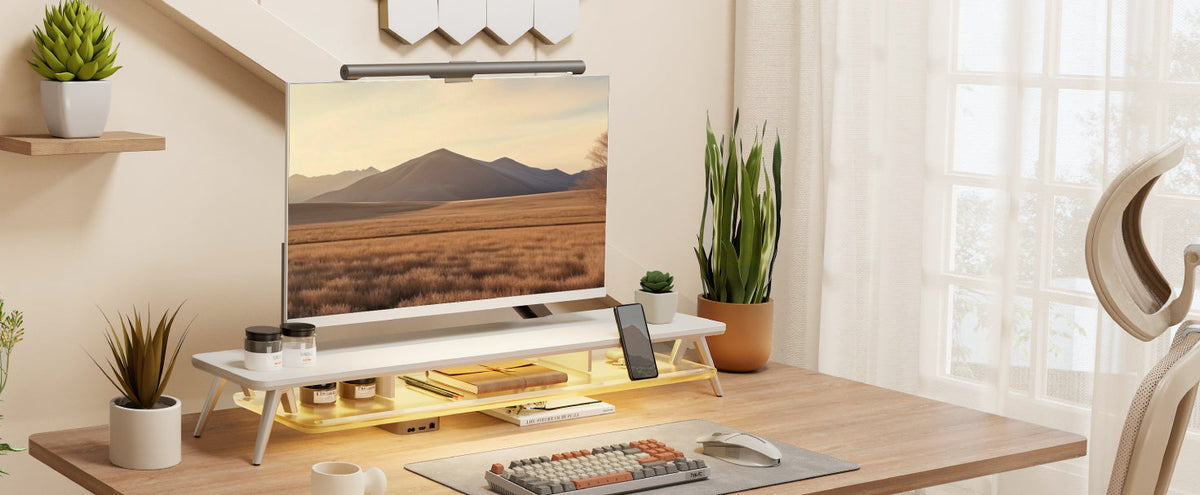
Best Monitor Light Bar: BenQ ScreenBar Halo 2, Logitech & Elgato
The best monitor light bar depends on where you want the light to go. A front-facing light can brighten your keyboard and face. A rear light bar or strip can add ambient color behind the screen. A panel light can give you more control for video calls, but it may use more desk or clamp space.
That distinction matters because “monitor light bar” is often used for several designs. Searches for screen bar light and monitor screen bar may describe a clip-on bar, a rear light bar, or a small streaming light positioned beside a monitor.
This guide compares three monitor-lighting options by use case. BenQ ScreenBar Halo 2 is a purpose-built monitor-mounted bar with front and rear lighting. Logitech Litra Glow and Elgato Key Light are front-facing or panel lights, so they solve a different part of the desk-lighting problem. The comparison is based on the brands' published product descriptions, so check the current product page for regional availability and specifications before ordering.
What Should a Monitor Light Bar Do?
A useful monitor light should put light where you need it without becoming another obstacle. For reading or typing, that usually means illuminating the desk surface. For video calls, it means placing soft light toward your face. For a gaming or entertainment setup, it may mean adding indirect light behind the display.
Start by identifying the task. A rear-facing light can make a wall or background more comfortable to look at, but it won't replace a front light for writing. A strong studio panel can work well for video, but its stand or clamp can compete with the space around your monitor.
Also check your screen shape and the space above and behind it. A curved monitor, a thick bezel, a webcam, and a monitor shelf can all affect where a light can sit.
3 Monitor Light Bar Options Compared
The products below are not identical. That is useful when choosing, because the right comparison is about the lighting job each one performs.
1. BenQ ScreenBar Halo 2: A Purpose-Built Monitor Light Bar
BenQ ScreenBar Halo 2 | Monitor Light Bar is designed to sit on top of a monitor and provide both front and rear illumination. BenQ's US product page positions it for curved monitors and dark-room setups, with an asymmetric front-lighting design and a rear-facing halo.
Its main advantage is that it addresses two lighting directions in one product. The front light is intended to illuminate the desk, while the rear light helps balance the bright screen against a darker room. BenQ also describes tri-zone backlighting, stepless brightness control, and rear-light color-temperature adjustment from 2700K to 6500K.
The included wireless controller is another practical strength. You can adjust the light without reaching over the monitor, which helps when the bar is mounted at the back of a deep desk. Before buying, check the monitor's top and rear clearance, the mounting requirements for your screen, and the current package contents for your region.

Best fit: users who want a dedicated monitor light bar, curved-monitor support, and front-plus-rear lighting for a darker room.
2. Logitech Litra Glow: Soft Front Light for Calls and Compact Desks
Logitech Litra Glow is a compact streaming light from Logitech, a Swiss company with a global US presence. Logitech describes it as a streaming light using TrueSoft technology to wrap the subject in soft light.
Its main advantage is the character of the light. A diffused front light can make a video-call setup look more even without putting a large panel in the center of the desk. It is a sensible choice when your priority is your face and upper body during calls, online teaching, or streaming.
It is not a traditional monitor-mounted light bar, so don't choose it expecting a long, even wash across the entire keyboard. Check the mounting position, cable route, and webcam field of view. If the light sits beside the display, leave enough space for your mouse and any monitor stand.
Best fit: compact desks, video calls, and users who want soft front lighting with a small footprint.
3. Elgato Key Light: App-Controlled Panel Lighting for Creators
Elgato Key Light is a professional LED panel from Elgato, a brand owned by US company Corsair. Elgato's product information describes a Wi-Fi-enabled panel with 160 OSRAM LEDs, up to 2,800 lumens, and app controls for power, brightness, and color temperature.
The advantage is control. A panel light gives creators more output and more room to tune the look of a camera image than a small clip-on bar usually does. You can position the light to one side of the monitor, then adjust it from the Control Center app without reaching across the desk.
The tradeoff is physical space. A panel and its mount need a clear position beside or behind the desk. Before you buy, check the clamp area, the monitor's rear clearance, and whether the arm or panel will block a speaker, camera, or shelf.
Best fit: video creators, streamers, and home-office users who need adjustable front light and have room for a panel mount.
| Brand and product | Lighting type | Main strength | Check before buying |
|---|---|---|---|
| BenQ ScreenBar Halo 2 | Monitor-mounted front and rear light | Dedicated bar, curved-monitor positioning, and dual-direction light | Top and rear clearance, current regional package |
| Logitech Litra Glow | Soft front-facing streaming light | Compact, diffused light for calls | Position, webcam view, cable route |
| Elgato Key Light | Wi-Fi-controlled LED panel | Higher output and app control | Panel and mount clearance |
5 Checks Before Choosing a Monitor Light Bar for Your Desk
1. Decide Where the Light Should Go
Front light is useful for faces, keyboards, and notes. Rear light is useful for the wall or background. If you want both, plan two separate light sources instead of expecting one product to do every job.
2. Check Screen and Webcam Compatibility
Measure the top bezel, screen curve, and the space around the webcam. A light that fits a thin flat display may not sit securely on a thick or curved one. Make sure the light does not cover a camera, sensor, microphone, or ventilation opening.
3. Map the Mount and Cable Path
Look behind the display before buying. A monitor shelf, wall, arm, or cable channel can change how far a clamp opens. Leave enough space to unplug the light without moving the monitor.
4. Match Controls to Your Routine
Physical buttons suit quick changes. A remote or app can help when the light is mounted out of reach. Smart lighting adds flexibility, but it may also add a bridge, account, or network requirement.
5. Treat Comfort Claims Carefully
Avoid assuming that a brighter light is automatically more comfortable. Start with moderate brightness, reduce reflections, and balance the screen with the surrounding room. If a light causes glare, change its angle or placement before increasing output.
Monitor Light Bar vs. Desk Lamp
A monitor light bar saves the space that a desk-lamp base would occupy, but it has less freedom to move around the room. A desk lamp can illuminate a notebook from the side, while a bar is tied to the monitor's position.
For a small desk, a compact front light or rear light bar may be easier to place. For a large desk used for drawing or paperwork, a movable lamp may cover more of the work surface. Choose based on the task and the available mounting space.
How a Monitor Riser Complements Monitor Lighting
Lighting and monitor elevation solve different desk problems. A light changes the visual environment. A monitor riser changes the height and levels of the workspace. Combining them can work well when each component has enough clearance.
A FENGE monitor stand can raise the screen and create space underneath for a keyboard, notebook, or small accessories. A drawer-equipped model can keep spare cables, remotes, and adapters out of the main work area. This can make the light's cable easier to route, but it does not guarantee compatibility with every light mount.
Before combining a riser and a light, measure the monitor's top and rear clearance, the riser's platform depth, the light's clamp, and the path of the USB or power cable. Check that the light mount does not press against the platform or affect the monitor's stability.
Choose a Riser That Fits Your Setup
For a more atmospheric desk setup, the FENGE Rodin A410 monitor riser features a color-changing LED light bar and a transparent acrylic platform. In a darker room, the illuminated acrylic design adds a distinctive visual element to the area around your monitor.

The FENGE Matrix M210 adds drawer storage beneath the monitor platform for small everyday accessories. Its modular design lets you customize the setup with options such as a headphone stand, laptop stand, phone holder, or iPad holder. You can arrange these accessories around the devices and habits you use most often.

Check the current dimensions and configurations on the relevant product pages before ordering. Treat the lighting and riser as separate decisions: first decide where the light should point, then choose a riser that leaves enough room for the screen, support base, keyboard, and cables to work comfortably.
Build a Better-Lit, Better-Organized Desk
Choose the lighting direction that matches your work, then plan the screen height, storage, and cable clearance around it. Explore FENGE monitor risers when your desk needs a more useful second level.
👉Explore FENGE monitor risersFrequently Asked Questions
What is the best monitor light bar?
There is no single best option for every desk. BenQ ScreenBar Halo 2 suits dedicated monitor-mounted front and rear lighting, Logitech Litra Glow suits soft front lighting, and Elgato Key Light suits adjustable creator lighting. Choose by lighting direction and mounting space first.
Are these products all clip-on monitor light bars?
No. BenQ ScreenBar Halo 2 is the dedicated monitor-mounted bar in this comparison, while Logitech Litra Glow and Elgato Key Light are front-facing lights. Product listings and compatibility should be checked before treating any option as a direct replacement for a traditional clip-on bar.
Can I use a monitor light with a monitor riser?
Often, but you must check clearance. Measure the light mount, monitor top and rear, riser platform, and cable path. Make sure the light does not press against the riser or cover the webcam.
Is a rear light bar enough for desk work?
Usually, rear ambient lighting is intended to add background light. You may still need a front light or room light for reading, writing, and seeing the keyboard clearly.
Related Articles
Monitor Stand With Drawer: How to Choose the Right One for Your Desk
How High Should Your Monitor Be? A Practical Desk Ergonomics Guide

Share:
Before and After: How a Monitor Riser Changes a Small Desk Setup
Should I buy a 27-inch or a 32-inch monitor for everyday office work?