

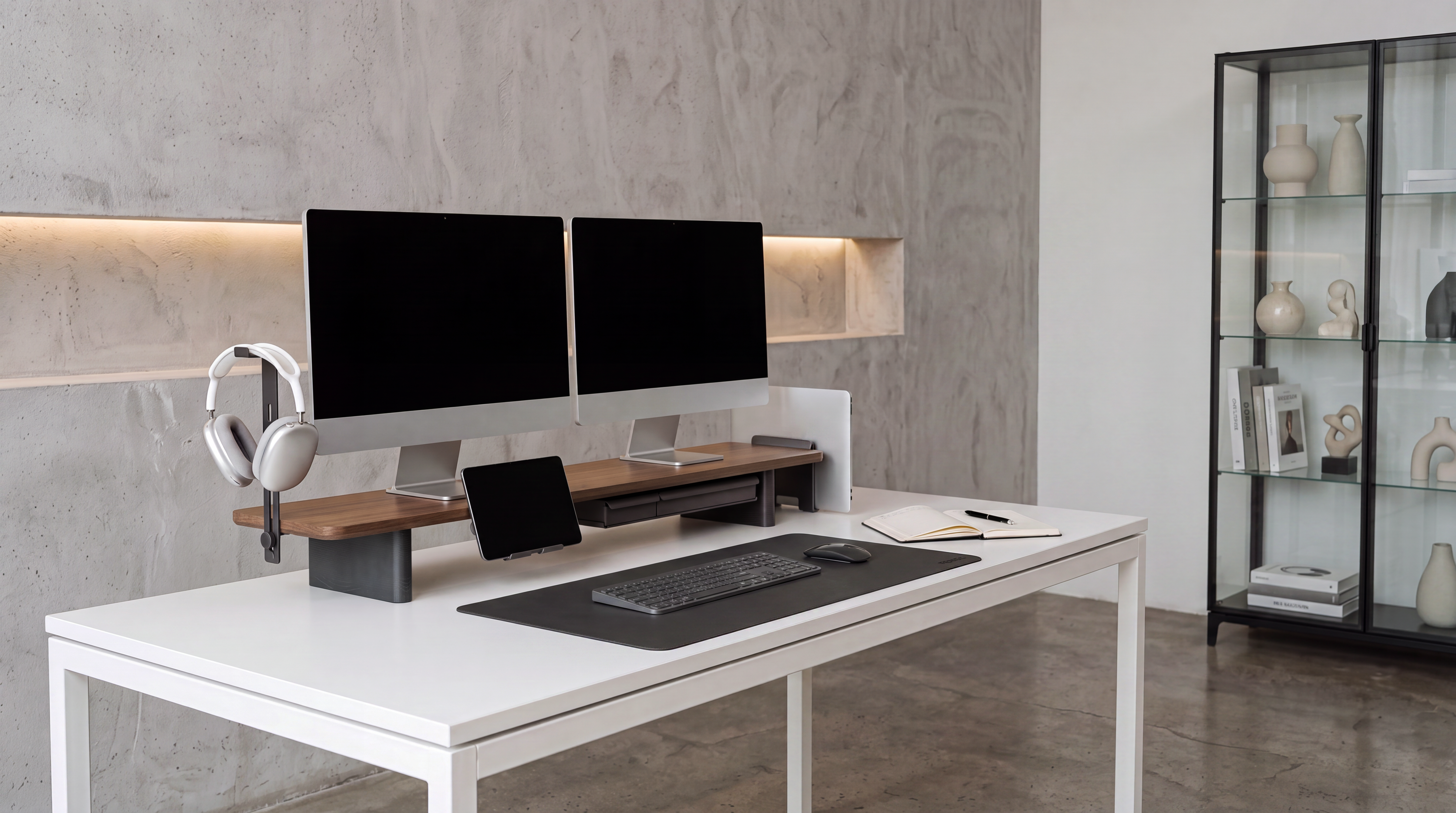
The right monitor stand with drawer should solve three problems at once: it must support your monitor safely, raise the screen to a more comfortable position, and store the small items that otherwise interrupt your work area. If any one of those jobs is compromised, the drawer is only decoration.
Start with measurements, not style. Record the footprint and weight of your monitor, the lift your screen needs, the usable depth of your desk, and the items you plan to put away. Then compare drawer access, platform stability, materials, and cable clearance. This approach turns a vague furniture purchase into a practical fit check.
Key Takeaways
- The usable platform must be wider and deeper than the monitor's complete base, not just the screen panel.
- Choose height from your seated eye position before comparing drawer capacity.
- A shallow, organized drawer is usually better for frequently used desk tools; deeper storage suits bulkier, less frequently used items.
- Check whether the drawer can open without hitting your keyboard, laptop, or desk accessories.
- Confirm the current load rating on the product page and include everything placed on top in your total load.
What Makes a Monitor Stand With Drawer Worth Buying?
A drawer-equipped stand is worth buying when it replaces loose storage while improving the monitor's position. It uses the vertical space below the display instead of claiming another area of the desk. That makes it especially useful on compact desks, shared workstations, and setups where a keyboard needs a clear place to park.
The best designs separate quick-access storage from open clearance. A drawer can hide adapters, charging cables, pens, sticky notes, and other small items. An open shelf can hold a keyboard, notebook, or closed laptop. Together, these features let a monitor stand organizer support both visual order and an efficient daily routine.
A drawer is less valuable when it is too shallow for the intended items, difficult to open, or positioned where it competes with the keyboard. It also cannot compensate for an unstable platform or the wrong screen height. Treat storage as one part of the fit, not the first feature to choose.

Measure Your Monitor and Desk Before You Shop
Four measurements eliminate most compatibility mistakes: monitor-base width, monitor-base depth, total load, and required lift. Add the desk's usable depth and any rear-wall clearance to understand how the stand will affect your remaining work area.
Measure the complete monitor base
Measure the widest and deepest points of the original monitor base. Include feet that angle outward and any part of the base that extends behind the screen. Compare those figures with the flat, usable platform area, not only the product's outside dimensions. A raised rim, curved corner, or drawer housing can reduce the space that actually supports the monitor.
Calculate the real load
Use the monitor manufacturer's weight for the screen with its original stand attached. Add speakers, a laptop, a dock, or anything else that will sit on the platform. The product's published load rating needs to cover that complete total. For a dual-monitor setup, include both monitors and position their bases fully over the supported surface.
Protect your remaining desk depth
A stand can fit the desk and still leave too little room for comfortable input. Use this simple check:
Usable desk depth - stand depth - rear cable gap = remaining keyboard and mouse depth
Test the result against your keyboard, mouse, desk mat, and usual forearm position. Also measure the space needed to pull the drawer open. On a shallow desk, a slightly narrower stand with a clean open shelf may be more useful than a deeper computer monitor riser with storage.
Choose the Right Monitor Height First
A monitor riser should correct a screen that is too low without pushing it too high. Set your chair, keyboard, and desk position first. Sit naturally, look straight ahead, and measure how much lift is needed to move the display into a comfortable viewing zone.
Mayo Clinic's "Office ergonomics: Your how-to guide", published May 25, 2023, recommends placing the monitor directly behind the keyboard, about an arm's length away, with the top of the screen at or slightly below eye level. It gives a viewing-distance range of 20 to 40 inches as a general reference. These are starting points, not a reason to ignore screen size, vision needs, or how you actually sit.
The Canadian Centre for Occupational Health and Safety's "Office Ergonomics - Positioning the Monitor", confirmed current July 21, 2025, likewise explains that monitor guidance should be tailored to the user. Its positioning guide describes a slightly downward line of sight and warns that a screen placed above the horizontal eye line can create discomfort. If you wear bifocals or progressive lenses, a slightly lower screen may be more comfortable.
Practical test: place the monitor on a stable temporary platform that matches the height you are considering. Use the setup for normal reading and typing before buying. If you lift your chin, lean forward, or look through the wrong part of your lenses, adjust the target height.
Compare Drawer Layouts, Not Just Drawer Count
The most useful drawer layout matches the size and frequency of the items you store. One wide drawer provides flexible space, while two smaller drawers can keep tools from collecting in a single pile. Open storage is faster for a keyboard or notebook, but closed storage creates a calmer visual surface.
Shallow drawers for daily tools
Shallow drawers work well for pens, charging cables, memory cards, adapters, sticky notes, and other low-profile objects. These items are easier to find when they remain in one layer. If the drawer is much deeper than the contents, small accessories tend to stack and become harder to retrieve.
Deeper drawers for less frequent items
Deeper storage can suit a compact notebook, game controller, larger hub, or other bulky accessory. Measure the interior height and depth rather than assuming the outside profile reflects usable space. Remember that handles, slides, and rear stops may reduce the drawer's internal capacity.
Open shelf space for a keyboard or laptop
A monitor stand with storage often combines drawers with a central shelf. Measure the tallest item you want to slide underneath, including rubber feet or a protective case. If you store a laptop or electronic device, preserve its ventilation and avoid a closed compartment that traps heat.

Which Materials Work Best for a Monitor Riser With Drawer?
Material affects stability, weight, maintenance, and the way the stand fits the rest of the desk. No single material is best for every setup, so compare construction and load support before choosing by appearance.
| Material | What it does well | What to check | Best fit |
|---|---|---|---|
| Solid or layered wood | Warm appearance, substantial feel, natural match for wood desks | Surface finish, edge quality, warping resistance, drawer movement | A wood monitor stand or wooden monitor stand for home offices and design-focused setups |
| Metal | Thin structural sections, durable hardware, easy integration with slides | Sharp edges, coating quality, flex across wide spans, desk protection | Utility-focused workstations and heavier equipment |
| Acrylic | Visually light profile and a clean, floating effect | Material thickness, scratch care, support geometry, visible fasteners | Minimal or modern desks where visual openness matters |
| Mixed materials | Can combine structural strength with wood storage and a lighter appearance | How joints, drawer slides, and feet connect across materials | Buyers who want the function of a wooden desk organizer with a more architectural monitor platform |
Regardless of material, look for anti-slip feet, full contact with the desk, and a platform that remains steady when the drawer opens. If the product arrives flat-packed, confirm that the fasteners are accessible for later tightening.
Check Drawer Access, Cable Routing, and Daily Reach
A good monitor riser with storage should reduce small interruptions. Put frequently used items in the easiest drawer or open compartment, and keep less-used accessories farther back. Do not use the drawer as a catch-all for items that belong elsewhere.
Route power and video cables so the drawer cannot catch, pinch, or pull them. Leave a gentle bend behind the monitor and enough slack to move the stand slightly for cleaning. If a dock or charging hub sits under the platform, make sure its ports remain visible and reachable.
Drawer position also changes reach. A centered drawer is easy to access from either side but may occupy the keyboard-storage zone. Side drawers preserve a central opening but can be less convenient on a narrow desk. Sketch the top-down layout before buying if your setup includes speakers, a laptop stand, a microphone, or a large desk mat.
Match the Stand to Your Desk Setup
| Desk setup | Prioritize | Avoid |
|---|---|---|
| Compact home-office desk | Shallow depth, keyboard clearance, one organized drawer | A deep platform that leaves no room for forearms or a mouse |
| Single large monitor | Complete base support, correct lift, central stability | Choosing by screen diagonal without measuring the base |
| Dual-monitor setup | Combined base width and weight, even load distribution, wide cable route | Letting either monitor base overhang the platform |
| Monitor plus laptop | Open center clearance, ventilation, separate input devices | Closing an active laptop inside an unventilated compartment |
| Creative or gaming desk | Controller and media storage, cable access, speaker placement | A drawer front that collides with a large desk mat or keyboard |
A Drawer-Equipped FENGE Option to Consider
The Yugen Y310 Monitor Riser combines a raised monitor platform with two solid wood drawers and an open center shelf. The current product page lists overall dimensions of 42.5 x 9.1 x 5.1 inches, an 8 mm acrylic structure, and materials including beech wood, acrylic, and metal. It also identifies support for as many as two monitors up to 27 inches.
This layout is most relevant if you want separate closed storage on the left and right while keeping the center open for a keyboard or notebook. The 42.5-inch width also makes it a candidate for wider arrangements, but buyers should still measure the complete monitor bases and compare the latest specifications before ordering.
Matrix M210: Premium Materials with Customizable Storage
If you want a monitor stand that combines integrated storage with a more personalized workspace, consider the Matrix M210 Monitor Riser. As part of FENGE's premium Matrix Series, the M210 is designed around high-end materials and flexible accessory configurations, giving you a practical way to raise your monitor while keeping everyday desk essentials organized and within easy reach.
The built-in drawer provides a convenient place for charging cables, adapters, pens, notebooks, and other small accessories that can otherwise clutter your desk. The Matrix Series is especially suitable for users who want to customize their setup around their own devices and habits. Before ordering, measure your monitor base, available desk depth, and the clearance needed to open the drawer, then confirm the latest dimensions and weight rating on the product page.

Compare Monitor Stands by Fit and Storage
Review platform dimensions, storage layouts, materials, and monitor support across the current collection, then compare each product page with your own measurements.
Use This Final Buying Checklist
- Measure the monitor base at its widest and deepest points.
- Confirm the monitor's weight with its original stand attached.
- Add the weight of every item that will sit on the platform.
- Measure the lift needed from your normal seated position.
- Subtract the stand depth and cable gap from your usable desk depth.
- List the exact items that belong in the drawer and measure the largest one.
- Check the interior drawer dimensions and opening clearance.
- Confirm ventilation for any electronic device stored below the platform.
- Verify anti-slip feet, platform support, and drawer-slide construction.
- Read the current product specifications instead of relying on a marketplace title or photo.
If a model passes all ten checks, it is much more likely to function as a true monitor stand organizer instead of becoming another surface that collects clutter.
Frequently Asked Questions
Is a monitor stand with a drawer worth it?
Yes, when you need both monitor elevation and accessible storage in the same footprint. It is less useful if the drawer blocks your keyboard, stores items you rarely need, or forces the screen above a comfortable viewing height.
How tall should a monitor stand with storage be?
Choose the height from your seated eye position and current screen height. The top of the display is commonly placed at or slightly below eye level, but your screen size, chair, vision, and corrective lenses can change the best position. Test the intended lift before buying.
Can a monitor riser with a drawer support two monitors?
It can if the usable platform fits both bases and the published load rating covers the combined equipment. Check width, depth, weight distribution, and cable routing. Do not assume that a wide shelf is automatically designed for a dual-monitor load.
What should I keep in a monitor stand drawer?
Store small items that you use at the desk but do not need every minute, such as adapters, charging cables, pens, sticky notes, and memory cards. Use dividers if items overlap. Keep heat-producing devices ventilated and route connected cables outside the drawer's moving path.
Is a wooden monitor stand better than metal or acrylic?
Not automatically. Wood offers warmth and a substantial appearance, metal can provide slim structural support, and acrylic creates a lighter visual profile. Construction quality, usable dimensions, stability, and load support matter more than material alone.
Final Recommendation
The right monitor stand with drawer is the model that fits your monitor, raises it by the measured amount you need, and gives every stored item a clear purpose. Begin with the monitor base and desk depth, then compare drawer layout, construction, and cable access.
Do not choose the biggest drawer or tallest platform by default. A well-fitted stand should make the desk easier to use without creating a new reach, clearance, or stability problem. Measure first, test the target height, and verify current product specifications before you buy.

Share:
How to Choose a Monitor Stand for Dual Monitors or a 32-Inch Monitor
How to Organize Cables on a Dual-Monitor Desk Setup